
Skalman on Home Assistant
This is the story of how we got our robot lawn mower — a Husqvarna Automower 310 that goes by the name Skalman — to show up in Home Assistant, complete with battery status, what it's doing right now, and buttons to start, pause and send it home. It sounded simple in theory. It wasn't.
Background
Skalman is an older model (roughly— 2016the vintage).generation before Husqvarna's “Mark II” refresh, which dates to around 2016. There's no cloud service we can reach — the "Automower Connect" menu on the mower is locked behind a "contact your dealer" message, so the normal route via Husqvarna's app and official integration was closed to us. The only thing we had to work with was Bluetooth (BLE), which the mower speaks locally.
The problem with Bluetooth is range. The mower and its charging station sit a fair distance away, and our Home Assistant server can't reach that far over Bluetooth. So we needed something close by.
How the solution works
The answer turned out to be a small Raspberry Pi placed out near the mower. It acts as a bridge: it talks Bluetooth to Skalman on one side, and passes the information on to Home Assistant over a messaging protocol called MQTT on the other side.
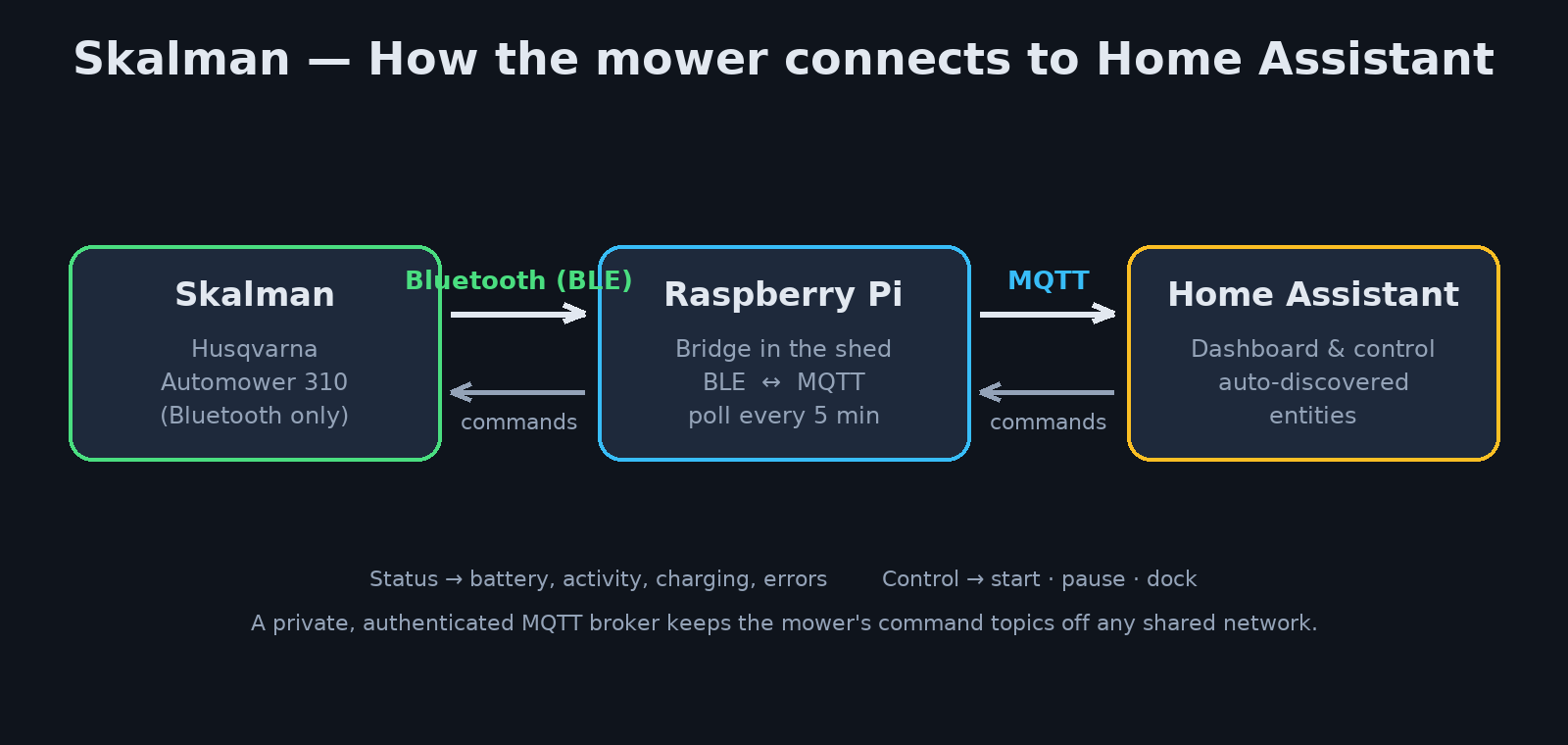
In broad strokes: the Pi sits close enough to get a decent Bluetooth link, and it's running around the clock anyway since it looks after other things out in the shed. Home Assistant never has to care about Bluetooth itself — it just subscribes to what the bridge publishes.
The Bluetooth pairing — the tricky bit
This was the part that took by far the longest, and it's worth writing down so we don't have to sweat as much next time.
A modern Bluetooth stack (like the one in a recent Raspberry Pi) wants to pair using the most secure method by default: encrypted "secure connections" with protection against eavesdropping. A 2016-era lawn mower can't do that. It only speaks the simpler, older dialect ("legacy pairing" using the "Just Works" method). The result is that the mower politely replies "pairing not supported" and hangs up — and you sit there scratching your head.
The key was to force the Bluetooth controller on the Pi to speak the old dialect and switch off the demand for the advanced security mode. Once both sides were speaking the same language, it went through.
One extra hurdle: because the pairing menu on the mower is locked, you can't put it into pairing mode the usual way. The trick is to flip the main power switch off and on — that opens a three-minute pairing window on the mower. During that window the phone's Bluetooth needs to be off (the mower only lets one device in at a time), and then you run the pairing on repeat until it takes. For us it took a couple of attempts.
One important detail: the Bluetooth pairing itself and the mower's PIN code are two completely separate layers. The Bluetooth bond needs no code, whereas the machine's PIN is sent by the software afterwards, at the application level. Good to know when troubleshooting — you can have a working Bluetooth link and still be rejected because the PIN layer is misbehaving, or the other way around.
Note: The Bluetooth bond is tied to the specific Bluetooth adapter. If we swap the dongle, or move to a different device down the line, we'll have to run the whole pairing procedure again.
The bridge that ties it all together
The Pi runs two parts:
- A reader that does exactly one thing at a time: connects to Skalman, reads the status (or sends a command), and disconnects cleanly again. It uses a clever library that reuses a cached device reference instead of scanning the airwaves every time, which makes the connection considerably faster. A lock makes sure only one Bluetooth session runs at a time, so nothing collides.
- The bridge itself, which runs the reader at regular intervals (every five minutes) and publishes the result to MQTT. It also sends out so-called auto-discovery, which means Home Assistant automatically creates the right entities without us having to configure anything by hand. In the other direction, the bridge listens for commands from Home Assistant and translates them into the mower's language.
Everything runs as a service that starts automatically and restarts itself if something goes wrong.
What showed up in Home Assistant
Once discovery was in place, a row of entities popped up, entirely automatically:
- Battery level
- What the mower is doing right now (mowing, heading out, heading home, charging, parked …)
- Charging status
- Any error codes
- And a proper lawn mower control with buttons to start, pause and dock
The mower's many different modes are translated into a handful of understandable states in the interface, so the card in Home Assistant simply shows "mowing", "docked", "paused" or "error".
Security
To begin with, the message traffic lived on a shared community broker. We moved away from that fairly quickly and shifted everything to our own, private broker with a login. The reasoning is simple: the command topics are the way in to actually control the mower. If they sit on a broker that others can reach, others could in theory send the mower off. Now the traffic is private and authenticated.
A bug we had to chase
A fun detail worth remembering: for several days Skalman reported nice status in Home Assistant, but the Play button did nothing — the mower refused to leave the dock.
It turned out the start command was being translated into "resume", which only works if the mower is already in the middle of a paused mowing session. From a docked/parked/schedule-controlled state, nothing happened at all. The fix was to make Play send a "mow now" command instead, one that bypasses the schedule and sends it out for a while straight away. After that it obeyed.
Range and reliability
Bluetooth through a shed wall isn't magic. The signal is fairly weak, and it shows:
- When Skalman is on the dock, the link is stable and the readings work fine.
- When it's out mowing and moving around the garden, the bridge often misses a reading. That's no big deal — the bridge logs it, skips it, and tries again next cycle without crashing.
If we want rock-solid status even while mowing, there are a couple of ways forward: hold a Bluetooth connection open the whole time instead of reconnecting over and over, or put a Bluetooth repeater closer to the garden. But for our needs — knowing the battery and mode, and being able to control it — today's solution does the job nicely.
Bonus: a rain guard
Since we had control over the mower anyway, we built a little rain guard. We don't have our own rain sensor, so we use the weather forecast. When it's raining, Skalman is kept on the dock, and it also has to wait an adjustable while after the rain stops so the grass can dry out a bit before heading out again. There are controls in the interface to switch the protection on and off and to adjust how long it should wait. The rain guard respects the mower's own schedule — it only releases the hold, it never forces it out.
Status
Skalman is up and running: status shows in Home Assistant, and start, pause and dock all work. What's left is mostly polish — above all making the readings more reliable while it's out and moving. But the foundation is solid, and it's mowing away.